
Appearance
Compliance Calendar
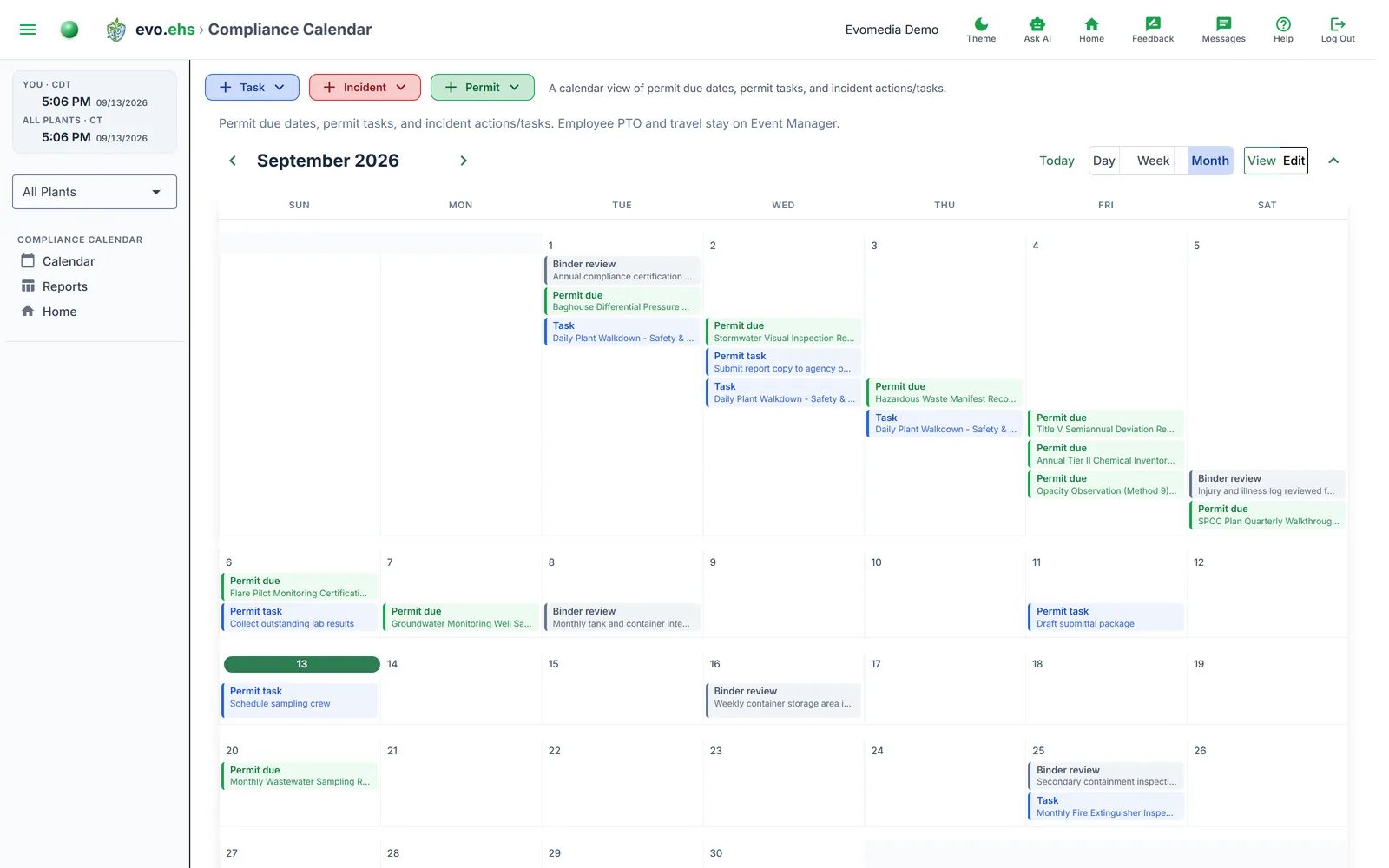
A calendar view of permit due dates, permit tasks, and incident actions/tasks. Employee PTO and travel stay on Event Manager.
Compliance Calendar and Compliance Reports are two views of the same records, each with its own entry in the section submenu. The calendar answers "what is happening this month"; the report answers "everything between these two dates".
Calendar
The calendar draws the same grid as Event Manager, so the two read alike.
Choose Day, Week or Month with the switcher at the top right. The arrows either side of the title move by whichever unit you are looking at — a month at a time in Month, a week in Week, a day in Day — and Today returns to the current one. The chevron at the far right collapses the calendar when you want the page for something else.
Each obligation is a bar on the day it falls, carrying its type and the record's name. The colour is the same one that type uses everywhere else in evo.ehs — the one on the +Task, +Incident and +Permit buttons:
| Type | Colour | Because |
|---|---|---|
| Permit due | green | it is a permit |
| Permit expires | green | it is a permit |
| Incident action | red | it is an incident |
| Regulatory report | red | it belongs to an incident |
| Permit task | blue | it is a task |
| Incident task | blue | it is a task |
| Task | blue | it is a task |
| Training | neutral | no colour of its own yet |
| SDS review | neutral | no colour of its own yet |
| Binder review | neutral | no colour of its own yet |
A task is blue whichever record it belongs to; the bar's own label says which kind of task it is.
What each type is:
- Permit due — the renewal date, from the permit's recurrence, override or expiry. Permit expires appears as well only when a permit has both a renewal cycle and a separate expiry date.
- Regulatory report — the deadline for an OSHA 8-hour or 24-hour report on a flagged incident, on the day it falls.
- Task — a task's due date, or one occurrence of a recurring task. A weekly task shows once per week, on each occurrence.
- Training — the day a person's completion expires and the course is due for renewal. A course that was never taken has no date and is not on the calendar; the Training Matrix shows it as Not taken.
- SDS review — three years after a chemical's SDS revision date. A chemical with no SDS date on file is not on the calendar; the Chemical Inventory marks it.
- Binder review — a required audit binder item's next review date.
Hover a bar for its title, detail, plant and date. Click to select it, double-click to open the record it belongs to: the permit, incident, task or chemical, or the Training Matrix or Audit Readiness page.
If the current month has no obligations, the calendar opens on the next month that does (scanning up to 24 months ahead).
View vs. Edit mode
The View / Edit toggle sits with the calendar controls and decides what a double-click does:
- View — shows the item's row in context.
- Edit — opens the item's edit dialog directly.
This preference is saved to your account and applies the next time you open the page.
Compliance Reports
Reports in the section submenu lists obligations across a date range rather than one month.
Choose a Mode — Current Month, By Year, Year to Date, or a Date Range you pick — then press Filter. The table shows date, kind, title, detail and plant, and sorts on any of those columns.
Export CSV downloads the filtered list, including an Overdue column marking anything already past its date. Print prints it.
Plant filter
Both pages respect the sidebar plant filter, showing only obligations for the selected plant.