
Appearance
Event Manager
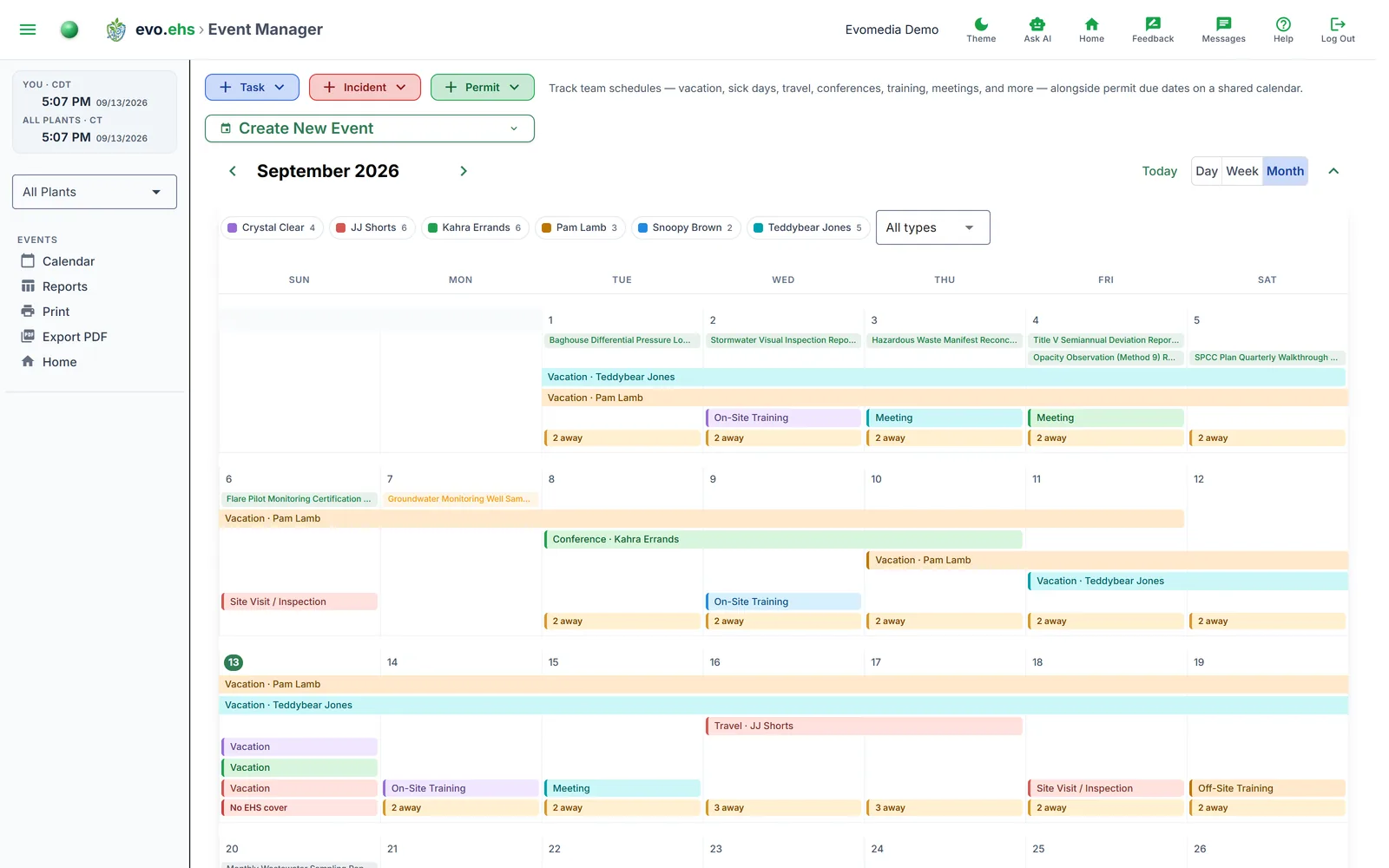 Track team schedules — vacation, sick days, travel, conferences, training, meetings, site visits, and more — alongside permit due dates on a shared calendar.
Calendar View
Navigate months with the arrow buttons or jump to today with Today.
An event is drawn as a single ribbon spanning every day it covers, so a two-week vacation is one continuous band across the calendar rather than a repeated chip in each day. A ribbon that runs past the end of a week continues on the next row, squared off on the side it continues.
Colour identifies the person, not the event type — the filter bar above the calendar lists everyone with an event that month, with their colour. Click a name to show or hide them. Because the colour already says who, a single-day ribbon shows only its type.
Event types:
| Type | Color |
|---|---|
| Vacation | Blue |
| Sick Day | Red |
| Travel | Purple |
| Conference | Cyan |
| Medical Leave | Rose |
| Meeting | Green |
| On-Site Training | Amber |
| Off-Site Training | Deep amber |
| Site Visit / Inspection | Orange |
| Other | Slate |
Click a ribbon to open its details — dates, person, plant, location and notes, with an Edit button. Double-click a day to create an event on that date, or double-click a ribbon to edit it.
On-Site Training and Off-Site Training are separate types because the calendar treats them differently: on-site training is someone at work with something in the diary, off-site training is someone who is not there. Only the second counts towards the markers below.
Overlaps and coverage
Two markers appear under the day they apply to.
"N away" (amber) marks a day two or more people are absent. This is information, not a fault — several people taking the same Friday off is a fact worth seeing, and twenty people at one on-site training is not an overlap at all. Hover it for one line per person, showing what each is away for:
Kahra Errands - Conference
Pam Lamb - Vacation
"No EHS cover" (red) marks a day when every EHS staff member assigned to a plant is absent, leaving that plant with nobody on site. Hover it for the affected plants and who is away. This is the one that matters: two people away out of twenty is nothing, two away out of two is a compliance problem. Staff count towards their plant's cover if they hold an EHS role (EHS Principle, Supervisor, Manager or Staff), are active, and are assigned to that plant.
Logging Visitors and Inspections
When an inspector or visitor arrives unannounced, log it as a Site Visit / Inspection event: pick the plant, add the location and notes (who, which agency, what they looked at), and the visit becomes part of your permanent, searchable event history.
Permit due dates appear on the calendar as chips on the day they fall, colour-coded by status.
Creating an Event
Expand Create New Event at the top, or double-click a day on the calendar. Fill in the team member, plant, start/end dates, type, location, and notes.
Editing and Deleting
Double-click an event to open the edit dialog. Click Delete within the dialog to soft-delete it (recoverable from the Recycle Bin).
Event Reports
Event Reports is its own page in the left menu, beside Event Manager — the same split Incidents uses. It holds a filterable table of every event: filter by All Time, By Year, Year to Date, Date Range, or Current Month, select rows, and print or export.
Exporting
- Print — opens a print-friendly view.
- Export PDF — downloads event data as a landscape PDF.